

FEATURE 03 / LOANS & REPAYMENT PLANNING
Loans &
repayment planning.
Track loan balances and see how repayments affect the time and interest left to pay. Vardon compares your recorded payments with the scheduled repayment plan and updates projections as you add overpayments or refinancing details.
View one loan or your active portfolio.
REPAYMENT PROJECTIONS
Follow your loan balance
Compare your balance with the scheduled plan and review the projected payoff date.
OVERPAYMENTS
See what extra payments change
Record overpayments and see their effect on the projected term and interest.
REFINANCING
Keep track of new loan terms
Add a new rate and effective date, then choose how the remaining term is handled.
HOW IT WORKS
Build a repayment plan from your loan details
Add the terms of your loan, then keep the record up to date as you make payments.
-
01 / ADD YOUR LOAN
Enter the amount and terms
Add the principal, deposit if applicable, term and start date. Choose a fixed rate or enter a staged rate schedule.
-
02 / RECORD PAYMENTS
Add repayments as you make them
Record the date and amount of each payment. Enter a regular repayment, an overpayment, or both.
-
03 / CHECK THE PROJECTION
Review the time and interest left
Compare the projected payoff with the scheduled plan. Update the loan when your rate or repayment terms change.
01 / REPAYMENT PROJECTIONS
See how your repayments compare with the plan
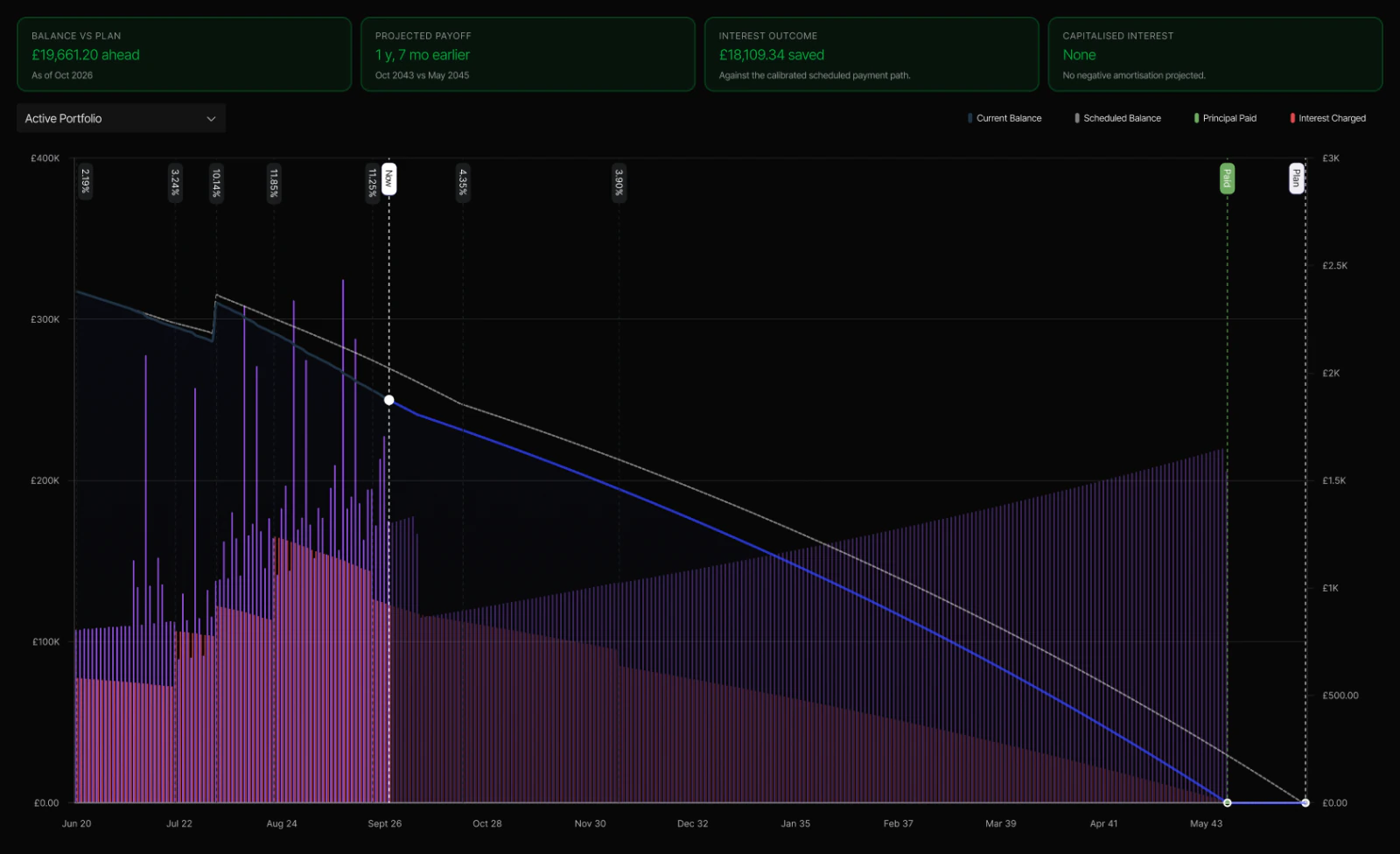
The loan graph compares your current balance with the scheduled balance. It also separates principal paid from interest charged, so you can see where your repayments go.
Review the projected payoff date and interest outcome for a loan or your active portfolio. The figures change as your payment records and loan terms change.
Read the loan documentation
02 / OVERPAYMENTS
Record the extra you pay towards a loan
Keep regular repayments and overpayments separate in your payment records. You can add an extra payment on its own or alongside a regular repayment.
Choose whether Vardon models overpayments as a shorter loan term or a lower monthly payment. The projection shows how that choice affects the remaining balance and interest.
03 / RATES & REFINANCING
Record a new rate and repayment term
Set up a loan with one fixed interest rate or enter rates for successive periods. Each stage has its own rate and duration.
When you refinance, add the new rate and the date it takes effect. Keep the same final repayment date, use a shorter term or keep the monthly payment. Vardon retains the original rate structure and records the refinancing phases.
Explore budgets & sinking fundsHOW SHOULD OVERPAYMENTS AFFECT YOUR PLAN?
A shorter term or a lower monthly payment
Vardon offers two ways to model extra payments. Choose the one that matches how your loan works.
REDUCE THE TERM
Plan for an earlier finish
Apply overpayments towards shortening the projected loan term. Review the revised payoff date and interest outcome.
REDUCE THE MONTHLY PAYMENT
Lower the remaining payments
Apply overpayments towards reducing the scheduled monthly payment over the remaining term.
This setting changes Vardon’s projection. Your lender’s terms determine how an overpayment is applied to your loan.
How does Vardon help with loan repayment planning?
Vardon uses your loan terms and recorded payments to project the balance, interest and payoff date. You can compare that projection with the scheduled repayment plan and review a single loan or your active portfolio.
Can I track overpayments separately from regular repayments?
Yes. A payment record can contain a regular repayment, an overpayment, or both. Vardon keeps the overpayment amount separate and includes it in the loan projection.
Can overpayments reduce the loan term or monthly payment?
Vardon supports both options in its calculations. Choose whether overpayments reduce the projected term or the monthly payment. Use the option that matches your lender’s terms.
Can I enter fixed and changing interest rates?
Yes. Use a fixed rate for the full loan term or enter an adjustable rate schedule with a rate and duration for each period. The projection uses the rates you enter.
How do I record a refinance or remortgage?
Add the new interest rate and effective date to the loan. Choose to keep its final repayment date, set a shorter term or keep the monthly payment. Vardon records the new phase alongside the original rate structure.
Are the payoff date and interest savings guaranteed?
No. They are estimates based on the loan terms, rates and payment records in Vardon. Changes to those inputs change the projection. Compare the figures with your lender’s repayment schedule and statements.
See the repayment plan for your loans
Download Vardon to record your loans and follow their projected payoff.
