

FEATURE 02 / BUDGETS & SINKING FUNDS
Budgets &
sinking funds.
Set budgets for everyday spending and create sinking funds for planned costs. Vardon shows how much of your budget you have used and how much you have allocated towards each savings goal.
Review your budget by day, week or month.


CATEGORY BUDGETS
Track everyday spending
Set amounts for your spending categories and see what remains, or how far over budget you are.
SINKING FUNDS
Plan for a future cost
Give a planned expense its own target and record the money you have allocated towards it.
TRANSACTION HISTORY
Check the spending behind it
Open a budget or a fund with linked spending to review the transactions behind the figures.
HOW IT WORKS
Set up your budgets and savings goals
Start with the spending you want to track and the costs you want to prepare for.
-
01 / CREATE A BUDGET
Choose categories and an amount
Name your budget, set an amount and select the spending categories it should include.
-
02 / ADD A SINKING FUND
Give a planned cost a target
Create a fund with a name and target amount. Use separate funds for different goals.
-
03 / REVIEW YOUR PROGRESS
Update your plans as you go
Review budget usage and record allocations to your funds. Change targets when your plans change.
01 / CATEGORY BUDGETS
See how much of your budget you have used
Create a budget for one or more spending categories and set an amount. Review your overall usage or open a budget to see the transactions behind it.
Switch the display between day, week and month. Remaining amounts, overspend figures and status labels help you spot budgets that need attention.
Read the budgeting documentation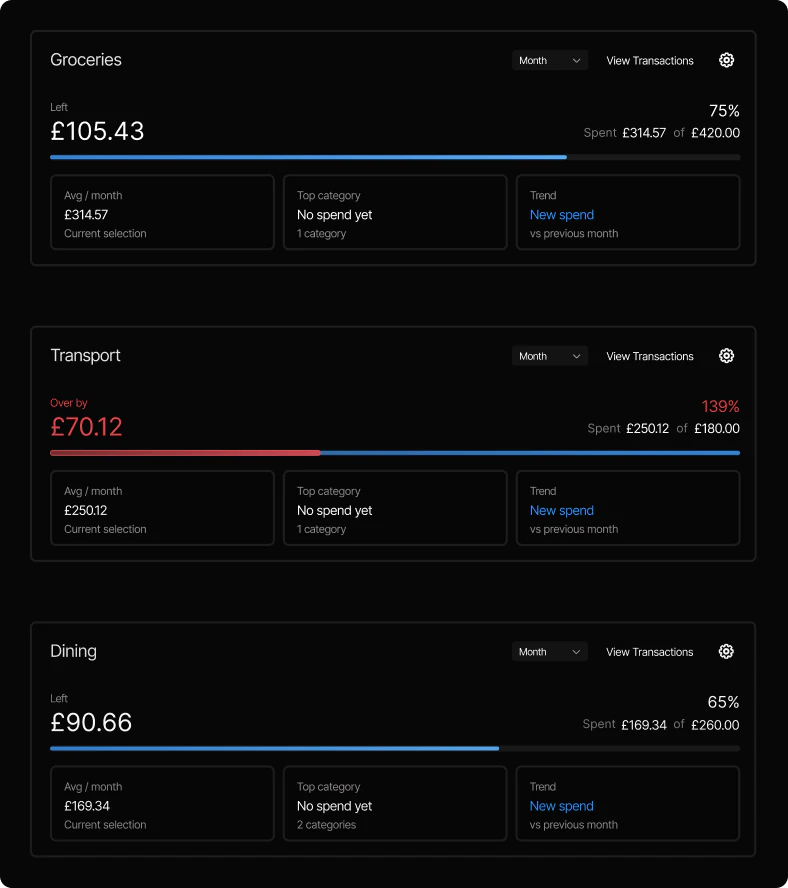
02 / SINKING FUNDS
Keep a target for each planned expense
A sinking fund records money allocated to a planned cost. Create a goal for a holiday or home repairs, give it a target and add allocations as you prepare for it.
See the amount funded against each target. You can edit the fund name, target or colour, return an allocation, and view transactions linked to the fund when it has spending.
Read our guide to sinking funds
BUDGETS OR SINKING FUNDS?
Choose the right plan for the expense
A budget tracks ongoing spending. A sinking fund records money allocated to a planned cost.
BUDGET
How much am I spending?
Set a spending amount for categories such as groceries or transport. Compare spending in those categories with your budget.
SINKING FUND
What am I saving towards?
Name a planned expense and set a target. Track the amount allocated to it and review any spending linked to the fund.
Funding a goal in Vardon records an allocation. It does not transfer money between bank accounts.
How bank connections work in VardonWhat is a sinking fund?
A sinking fund is money set aside for a planned expense, such as a holiday or home repairs. In Vardon, you give it a name and target, then record allocations towards that goal.
What is the difference between a budget and a sinking fund?
A budget compares ongoing spending with an amount you have chosen. A sinking fund tracks money allocated to a specific future cost. You can use category budgets for everyday spending and separate funds for planned expenses.
How does Vardon track spending against a budget?
You choose the spending categories a budget includes. Vardon compares spending assigned to those categories with the budget amount and shows usage, the amount remaining or any overspend. You can open the budget to review its transactions.
Can I view my budget by day, week or month?
Yes. Each budget has Day, Week and Month display options. Use the period selector to change how the budget is shown.
Can I change a sinking fund target or return an allocation?
Yes. You can edit a fund's name, target amount and colour, add funding or return part of its allocation. You cannot return more than the amount recorded in the fund.
Does funding a sinking fund move money between bank accounts?
No. Funding or returning money changes the amounts allocated inside Vardon. It does not make a bank transfer.
Start with your next budget
Download Vardon to track your spending and plan for future costs.
